
Documentation
This guide explains how to authentificate and call the main endpoints.
Documentation access
Below you will find the various technical documentation on authentication, the elements required to realize a test, and how to move to production.
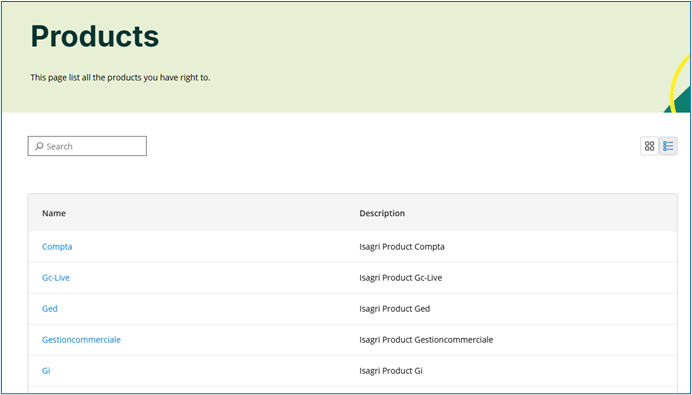
To visualize the Open API description, go to the Products menu

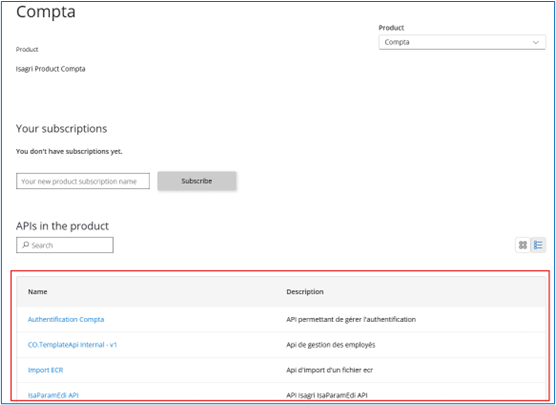
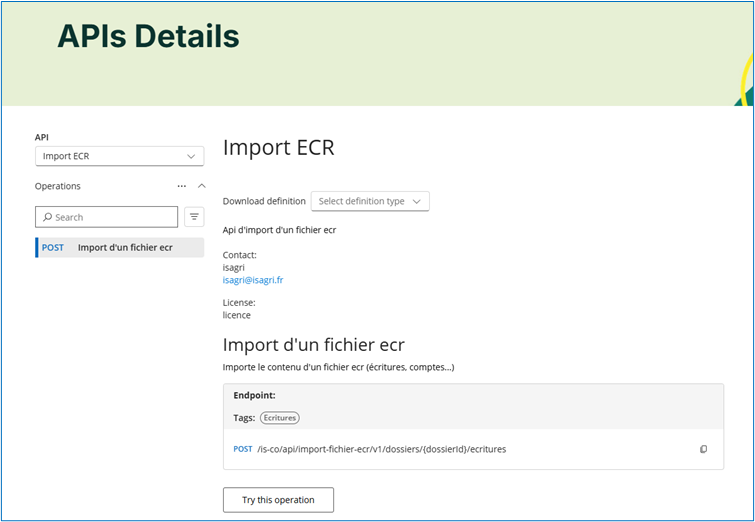
… then select the relevant software to access all available APIs.

Performing a Test
Performing a test for a specific API (using the “Try this operation” button) requires creating an account on this portal and obtain a personal API key.
Creating an account : Use the Sign up option in the top right menu

… and fill out the registration form
Preferably use a generic email address (e.g., dev@your-company.com) rather than a personal one to avoid linking the subscription to a specific individual.
… you will receive a confirmation email containing a link to activate your account.
Obtaining the API key : This key is unique for you and your application. To obtain it :
Go to the Products tab and select the desired product.
Name your subscription, indicating its intended use (e.g., “Subscription for CRM integration”) to facilitate future management, then click Subscribe.
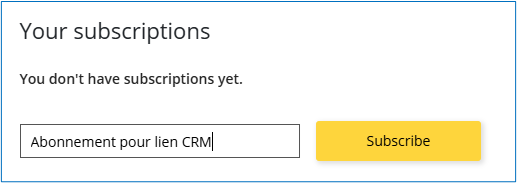
3. Once subscribed, go to the Profile tab
4. Your subscription will appear there. View the Primary key field to reveal your key (Ocp-Apim-Subscription-Id).

5. Test dataset-specific information : Check the documentation, and contact us by email (given in each application documentation) to retrieve the test token and DomainID.
Moving to Production
Refer to the documentation specific to each application (see access instructions above) to retrieve the token and DomainID for the client(s).